![pepperland-logo-vertical-1080px.png]](https://support.pepperlandmarketing.com/hs-fs/hubfs/pepperland-logo-vertical-1080px.png?height=40&name=pepperland-logo-vertical-1080px.png)
This process is free, easy, and should take no longer than five minutes.
Step 1: Check if you already have an account
If you signed in to any Google product before with your work email address, such as Gmail, Maps, or YouTube, you already have a Google Account. You can use the same username and password you created to sign in to any other Google products.
If you can't remember that you signed in and would like to check if you have an account, enter your email address. You'll find a message if there isn't a Google Account associated with your email address. If that's the case, proceed to step 2.
Step 2: If needed, create your account
- Visit https://accounts.google.com.
- Click Create account.
- If prompted, provide your birthday. It will also ask you to provide your gender. Gender is optional, and if you prefer, you can select "Rather not say."
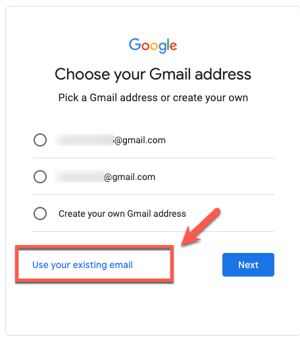
- IMPORTANT: When you get to the "Choose your Gmail address" step, select "Use your existing email."
- Enter your work email address.
- A verification code will be sent to the email address you provided. Check your inbox to get the verification code, and enter where prompted. Click verify.
Step 3: Protect your account with recovery info
If you forget your password or someone is using your account without your permission, updated recovery info makes it much more likely you’ll get your account back.